
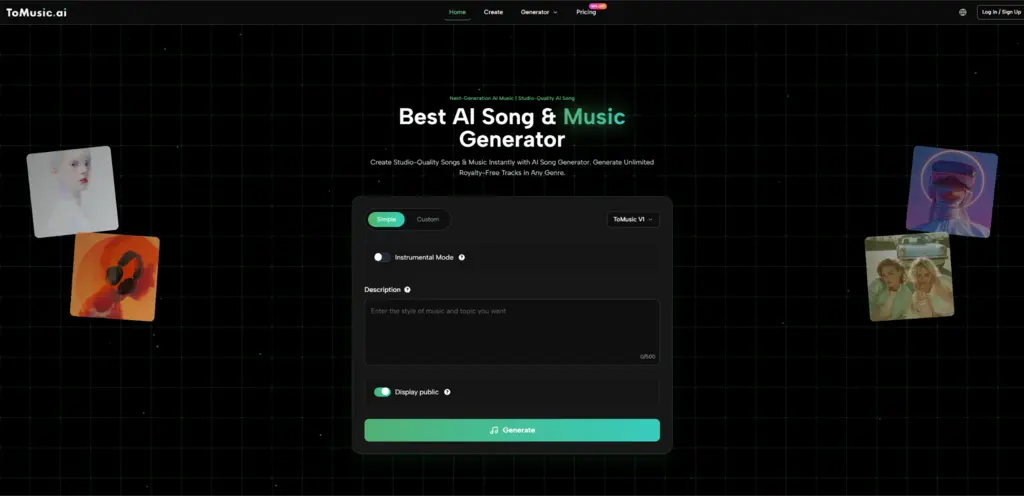
You’ve probably been there: the edit is tight, the pacing is right, and the message is clear—yet the moment you hit play, the silence feels louder than the visuals. The usual fixes (stock libraries, rushed loops, or “good-enough” ambient beds) can work, but they often flatten the mood you worked hard to build. That’s why tools like an AI Music Generator are starting to feel less like a shortcut and more like a practical sketchpad: not “magic,” but a faster way to explore musical directions when you need something that fits your narrative.
Why the Missing Music Hurts More Than You Think
Music isn’t decoration. It’s the invisible editor that tells your viewer what to feel—before they even understand what they’re seeing.
The Problem
- You need music that matches the arc of your content (intro tension, mid build, satisfying release).
- You don’t want to spend hours auditioning tracks that almost fit.
- You’re not trying to become a producer just to finish one project.
The Agitation
Stock music can be surprisingly “sticky” in the wrong way: once your audience recognizes a track, the mood becomes generic. And if you’re cutting to the beat, swapping music late can force you to re-edit everything. The more you care about pacing, the more painful that becomes.
A More Realistic Solution
Instead of hunting for the perfect track first, you can treat music like an iterative layer. Generate a few candidates quickly, then keep refining until the groove aligns with your cut.
A Creator-Friendly Mental Model: Music as a Mood Prototype
If you think of music like a color grade, the workflow becomes simpler:
- Pick the emotional palette.
- Apply it quickly.
- Adjust after you see it in context.
Where Text Prompts Actually Help
A good prompt isn’t poetry—it’s a brief. You’re describing:
- Mood (bright, uneasy, nostalgic, triumphant)
- Texture (lo-fi keys, cinematic strings, crunchy guitars, airy pads)
- Motion (slow drift, steady drive, energetic bounce)
- Scene context (product reveal, vlog recap, game trailer, meditation)
One practical advantage of a Text to Music AI approach is that it encourages you to describe intent first, which often leads to more consistent results than randomly browsing genres.
From “Good Enough” to “Fits the Cut”: A Simple Workflow
Step 1: Start with the edit, not the music
Lock your rough cut first. Don’t wait for a perfect track.
Step 2: Generate three distinct directions
Create options that are meaningfully different:
- One minimal and spacious
- One rhythmic and driving
- One cinematic and evolving
Step 3: Test in context
Drop each option into your timeline. You’re listening for:
- Whether the downbeats land where your cuts land
- Whether the energy lifts at the same time your visuals peak
- Whether the intro gives you enough room for narration
Step 4: Iterate with one change at a time
This is where many people get frustrated: they change five variables at once and can’t tell what improved. Keep each iteration focused:
- Same mood, different instrumentation
- Same tempo, different intensity
- Same structure, longer build
Step 5: Treat vocals as optional
Sometimes vocals instantly “brand” your piece. Other times, they compete with dialogue. When you want narrative clarity, instrumentals usually win.
Comparison Table: Where This Approach Helps (and Where It Doesn’t)
| Approach | Best For | What You Gain | What You Trade Off |
| ToMusic-style AI generation | Fast mood-matching for videos, reels, prototypes | Speed, variety, customized vibe | Output can vary by prompt quality; may require multiple generations |
| Stock music libraries | Reliable licensing, quick “safe” choices | Predictability, familiar structure | Tracks can feel generic; searching takes time |
| Hiring a composer | Signature sound, tailored storytelling | Maximum control, human interpretation | Cost, timeline, communication overhead |
| DIY in a DAW | Learning and full creative ownership | Deep control, skill growth | Time investment; steep learning curve |
How to Prompt Like a Producer (Without Becoming One)
Use a three-part prompt
- Emotion: “warm nostalgia with gentle hope”
- Palette: “piano + soft pads + light percussion”
- Movement: “slow build, then airy lift in the chorus”
Avoid overly abstract prompts
“Make it amazing” is hard to translate into music. Concrete direction helps
If the result feels off, diagnose before regenerating
- Too busy? Ask for “more space” or “minimal arrangement.”
- Too flat? Ask for “stronger dynamics” or “clearer build.”
- Too random? Ask for “simple motif” or “repeating hook.”
A Note on Lyrics and Voice: Powerful, but Not Always the Right Tool
If your project is a short film, trailer, or brand story, vocals can add instant character—but they also introduce risk:
- Words can distract from your message
- The vocal tone might not match your audience
- Pronunciation and phrasing can feel uncanny in some generations
That’s why I treat Lyrics to Song as a specific tool for specific moments: when the music itself is the content (a hook for TikTok, a theme for a channel, a demo chorus for an idea), not just background support.
Limitations That Make the Whole Thing More Trustworthy
AI music generation is useful, but it’s not effortless perfection:
- Results can vary widely depending on prompt clarity.
- You may need several tries to get a clean structure or satisfying progression.
- Some outputs can feel “samey” if you keep describing the same mood the same way.
- If you rely on vocals, you’ll notice differences in realism and phrasing across attempts.
A practical mindset is to treat outputs as drafts. In many cases, the best result comes from a small set of deliberate iterations rather than one “lucky” generation.

What This Enables, If You Use It Well
The real shift isn’t that AI replaces music-making—it’s that you can explore more options before committing. When you can audition multiple musical directions quickly, you stop settling for the first acceptable track. You start choosing music that supports your story.
Further reading (neutral)
For a broader overview of how text-to-music systems are evolving, look up the 2025 research review “AI-Enabled Text-to-Music Generation” (Electronics, MDPI).
Also Read-Laser Hair Removal for Different Skin Tones: What Recent Technology Advances Mean for Everyone
