A Practical Guide to Watching and Saving Reddit Clips Using a Reddit Video Viewer
Reddit gets a huge amount of videos every day now. A lot of these videos are just for fun, and people watch them once and scroll past. But some of them are actually useful, for example a short cooking video or a video showing how to fix something at home, and those are usually the ones people want to keep.
Finding those videos again later is not that easy on Reddit. The post gets pushed down by newer ones, the saved list gets long and messy, and sometimes the post just gets deleted and the video is gone with it.
A Reddit video viewer helps a lot here. Below there’s a simple explanation of what it is, the steps to watch and save a clip, and some fixes for problems that can happen while using it.
What Is a Reddit Video Viewer?
A Reddit video viewer is basically a website where a Reddit post link can be pasted to play the video on its own. The page usually just shows the clip and a few buttons, so there’s no comment section or list of other posts getting in the way while watching.
Most of these viewers work in a normal browser tab, so there is no need to install anything or log in with an account. This is helpful for people using an office computer where new software is blocked, or a phone that doesn’t have much storage left.
Many viewers also have a download option right under the video. So after watching the clip, it can be saved to the device in a couple of taps without going to another site to do it.
Why Bother Saving Reddit Clips?
It might seem unnecessary to save Reddit videos, since the post is right there anyway. But Reddit posts aren’t as permanent as they look. Moderators remove posts that break subreddit rules, people delete their accounts, and some communities have even gone private for weeks at a time. When any of this happens, the video usually goes too.
Having the file saved on the device avoids that. It also makes everyday things a little easier, for example following a cooking video in the kitchen and pausing it every few seconds, going back over a workout routine, or sending a funny clip to a family member who doesn’t use Reddit at all.
There’s no need to save everything though. Most clips are fine to watch once and move on. It’s really only the useful or memorable ones that are worth keeping.
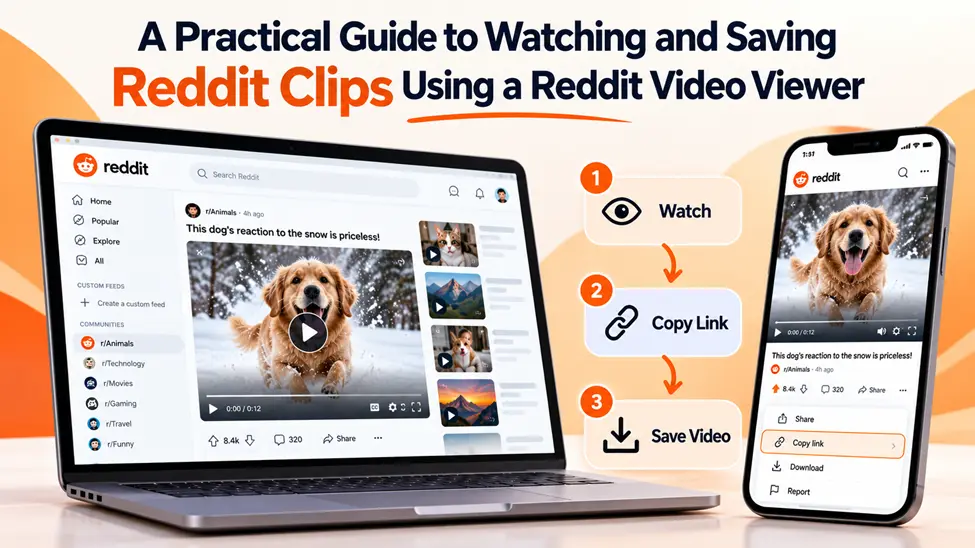
How to Watch and Save Reddit Clips Step by Step
The process is pretty much the same on Android, iPhone, Windows and Mac. It might take a couple of minutes the first time, but after that it usually takes less than half a minute.
Step 1 – Copy the Post Link
Open the Reddit post that has the video. In the Reddit app, tap the Share button and then Copy Link. On a computer, just copy the URL from the address bar of the post page.
Step 2 – Open a Reddit Video Viewer
Next, open a trusted reddit video viewer in the browser that is already on the phone or computer, whether that’s Chrome, Safari or any other one. It is worth looking at the site for a few seconds before using it. A normal tool is just one plain box for the link. Three pop-ups and a request for an email address before anything happens usually means it’s time to close the tab.
Step 3 – Paste the Link
Paste the link in and tap the button beside the box. A 20-second clip shows up almost straight away. Something closer to ten minutes long can take a little longer to process, so there’s no point refreshing right away.
Step 4 – Watch It Before Saving
Play the video before downloading it, even if just for a few seconds. This is the easiest way to check that it’s the right clip, that the sound is working and that the video isn’t cut off at the end. It’s much better to notice a problem now than after the file has already been saved and forgotten about.
Step 5 – Pick a Quality and Download
The right quality depends mostly on the screen. Anything watched on a laptop or a TV is worth grabbing in 1080p, since the extra detail actually shows up there. For phone viewing, 720p does the job fine and won’t eat as much space. After the download, the MP4 file ends up in the downloads folder, and pretty much every phone, laptop and smart TV can play it straight away.
Keeping Saved Clips Easy to Find
Saving one or two videos is easy. Things get messy after the first fifty, and that’s where a bit of organizing pays off.
Renaming each file right after it downloads helps more than anything else. The default names are usually a random mix of letters and numbers, and after a week or two it’s hard to remember which file is which. A short name like “pasta recipe” or “bike chain fix” makes it much easier to find later.
It also helps to keep clips in a few folders, such as Recipes, Workouts, Tutorials and Funny. There’s no need for anything complicated, just enough to stop everything ending up in one big downloads folder.
Storage is the other thing that sneaks up. HD videos are bigger files than most people think, and after saving a lot of them the phone can start running out of space. Moving older videos to a laptop or a cloud drive every month or so helps with this.
What to Do When Something Goes Wrong
Sometimes things don’t work the first time. Most of the time it’s one of these four issues.
The Video Won’t Load
In most cases the link is the problem. It’s really common to end up with a comment’s link instead of the post’s, since the two look nearly identical, so just head back to the post and copy it one more time. Still not loading? Then there’s a good chance the subreddit is private or quarantined. Those videos simply aren’t open to the public, so no viewer can pull them up.
The Saved Clip Has No Sound
This happens because Reddit stores the video and the audio of most posts as two separate files. Some basic tools only download the video file, so the clip ends up silent. A good viewer joins the two together before saving. It’s also worth checking the original post, since some videos were uploaded without any sound in the first place.
The File Won’t Open
A file that won’t open was usually cut off partway through downloading, which happens a lot on patchy Wi-Fi or mobile data. Deleting it and downloading again on a steadier connection normally sorts it out. If it still won’t play, try opening it in another media player, because some built-in players have trouble with certain files.
The Video Looks Blurry
The downloaded video can only be as clear as the original upload. If the person who posted it uploaded a low-quality clip, the saved file will look the same. If a higher resolution is available in the list, choose that one, otherwise there isn’t much that can be done.
Saving Clips Without Stepping on Creators’ Toes
Most people save clips just to rewatch them, and that’s generally fine. Trouble starts when a saved clip gets reuploaded to TikTok or YouTube as if it were someone’s own work, since the person who filmed it still owns it even after posting it on Reddit.
The U.S. Copyright Office explains what copyright protects and who owns a creative work on a short page that’s worth a look for anyone planning to share clips beyond friends and family.
When a clip does get shared, adding the original post link or the creator’s username takes ten seconds. It also means the person behind the video gets the credit instead of some random reposter.
Questions People Often Ask About Reddit Video Viewers
Is a Reddit account needed to use a video viewer?
No, an account isn’t needed. Only the post link is required, as long as the video was posted in a public subreddit.
Can a Reddit video viewer be used on a phone?
It can. Android, iPhone or an iPad, it doesn’t really matter much, because the whole thing happens inside the browser and there’s nothing to download first.
Does it cost anything?
Most good viewers are free to use. It’s best to avoid any site that asks for card details or makes users sign up before showing the video.
Why do some saved videos have no audio?
Reddit saves the audio and video of most posts separately. Good viewers combine them automatically, but some simpler tools only save the video part.
Can videos from private subreddits be saved?
No. Viewers can only access videos that are publicly visible, so posts from private communities won’t load.
Wrapping Up
Reddit has no shortage of good videos, but they have a way of disappearing, either buried under newer posts or taken down for good. Keeping a copy of the ones that matter takes care of that.
Copy the link, give the clip a quick watch, download it and name it something that makes sense. That’s a minute of effort at most, and it means the recipe or repair video is sitting right there on the phone the next time it’s needed.
Also Read