Build Stepwise Product Feature Explanations with AI Motion Studio
An organized visual sequence helps to clarify product features. Having multiple functions on display may overload viewers and make the information less prominent. The problem is solved with “stepwise animation” – adding individual capabilities in a logical sequence. Each function is explained clearly with animated text, product visuals, diagrams, and interface elements. Dreamina’s Motion Studio is an AI-driven platform for creating motion graphics with structure. It turns text prompts and visual cues into animated motion that is in sync. Its conversational workflow also enables creators to tweak transitions, time, and visual setups.
Why Present Product Features in a Stepwise Animated Format?
An AI motion studio helps arrange product communication in an organized manner by presenting the information through well-arranged animated scenes. Logical progression means there are not too many details introduced at once that would confuse viewers. A visual separation between the different capabilities is created, with each function getting its own visual section. Animated diagrams can also be used to show relationships between correlated product functions. With controlled timing, viewers are able to understand each explanation before another feature appears. The typography, colors, and transitions remain consistent throughout the presentation, giving it a recognizable visual identity. A brief description and some graphics make it easier to communicate complex products. This is especially suitable for software presentations, electronic products, equipment launches, and promotional presentations. Prompt-based animation instructions and customizable visual styles in Dreamina’s Motion Studio organize these explanations.
Plan a Product Feature Explanation Before Generating Animation
Good product animation starts with a well-defined product structure. Identify the product, its category, and its primary purpose. This information provides the context for the whole explanation. Then, choose the most critical ones that need attention. Don’t add minor functions that detract from the product’s core features. Sort the chosen features in an order that is conducive to natural understanding. For instance, teach simple operations first and then teach more advanced functions. Write brief descriptions of the function of each feature and its importance. Next, determine the appropriate supporting materials, such as product photos, icons, interface graphics, and diagrams. Finally, outline the closing sequence to give an overview of the product’s capabilities. This preparation will ensure that Dreamina’s Motion Studio is given better direction and continuity throughout the animation.
Build Stepwise Product Feature Explanations with AI Motion Studio
Step 1: Upload your product reference and outline the feature steps
- First, sign up or log in to Dreamina to start creating your product feature explainers.
- Next, head to “Motion Studio” on the left bar to open the explainer workspace.
- Then select the “Style” option to choose the specific style for your feature explainer video.
- Click the “References” tab to upload a video from your device or through a link. You can also choose a product demo clip from the assets library if you prefer.
- Write a prompt on how each step should look and feel, then add custom direction.
Step 2: Configure the explainer output and generate the video
- Select the custom aspect ratio from the “Aspect ratio” tab to suit your viewing platform.
- Click the “Duration” tab to select a custom video length that fits every feature step.
- Also, use “@” to mention or highlight a specific product or object within your video.
- Next, click the “Choose Mode” tab to select between standard and advanced modes. Standard mode handles regular creation, while advanced mode delivers polished results for client demos.
- Finally, click the “Generate” tab to begin creation of your feature explainer video right away.
Step 3: Check, refine, and download the explainer
- Watch the finished video in full screen and check the product framing, delivery, and pacing.
- If you don’t like the results, click the “Remix” tab to refine them again.
- Use the “Edit in canvas” option to edit the generated video with full creative freedom. Here, you can replace the background, add effects, crop the video, and more as needed.
- Once you are satisfied with the result, click “Download” to save the final video file. Then share it across your marketing channels and every product help page that you manage.
Organize Feature-by-Feature Animation Sequences
A carefully structured animation has a purpose for communicating every product feature. It begins with the name of a product and the visual identity. Then, animated headings or labels indicate individual capabilities. Each function is explained by a short description, with an indication of its usefulness. Supporting graphics, diagrams, and interface elements illustrate how the functions work. The movement of the body is coordinated to link one explanation to another without interrupting the flow in the presentation. Finally, a final sequence ties up the essential capabilities. Dreamina’s Motion Studio can follow these instructions via prompts that set the order of appearance, the path of the movement, the transitions, and pauses. This allows viewers to get to know each function separately and, at the same time, know how they are part of the whole product experience.
Use Dreamina’s Coding Agent to Coordinate Product Feature Animations
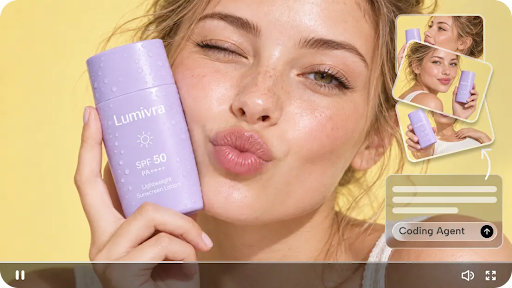
Dreamina’s Motion Studio features a Coding Agent to convert natural-language instructions into animated motion graphics. Users specify how the presentation is supposed to be done, without having to write animation code by hand. The Coding Agent is working in the background to create and render animation code. It sorts text, numbers, graphics, images, and interface elements based on the instructions provided. These elements are placed in a coordinated layout, size, colour, timing, and visual hierarchy. For instance, you could show an image of a product before the first feature heading. Supporting diagrams can be animated by a second instruction following the description. Creators can also choose the speed of the movement, how long to pause, and how the transition should behave. Follow-up prompts enable the feature descriptions, colors, layouts, and animation timing to be adjusted. Through this conversational process, refinement is made accessible, without demanding specialized coding skills.
Refine Feature Explanations for Clarity and Visual Consistency
Checking the created animation will help to discover issues that may hinder comprehension. First, check if the entire feature is shown in the desired order. Don’t put long descriptions in each scene; too much text is not readable! Use the same typography, colors, spacing, and graphic styles throughout the presentation. Ensure that transitions never obscure important product information. There should be sufficient screen time for each feature in order to allow viewers to comprehend its purpose. Explanations that are shorter may not need as many pauses, and longer or more complex demonstrations may require more. Check that images and interface graphics are accurately represented. Lastly, look at the closing so that you can verify that it conveys the product’s overall capabilities. When refinements are needed, Dreamina’s Motion Studio features conversational refinement.
Conclusion
The Stepwise animation takes complex information about products and makes it intelligently visual. Important features are introduced, explained, and related in individual scenes. Dreamina’s Motion Studio makes this easy with text prompts, visual references, and animation styles. It has a Coding Agent that generates and renders code in the background without having to program it—clearer presentations are supported by controlled timing, coordinated transitions, and conversational refinement. By planning carefully and reviewing the product feature animation, creators can make product feature animations that are able to convey information well.
Read more: Hélène Mannarino : Un Nouveau Chapitre S’ouvre avec l’Annonce de sa Grossesse – Celebre Buzz
Pierre et Frédérique Poids : Duo Culinaires d’Excellence au Cœur de la Gastronomie Française – Celebre Buzz